
 Special BonusConfirm email & deposit toget 20 free spins
 Welcome BonusFirst deposit bonusGet 250 Free Spins
The QueenWin App: Your Casino, Anywhere, Anytime
We don’t have a separate app sitting in the App Store or Google Play. Instead, we built something better—a mobile platform running directly in your browser. No downloads eating up storage, no waiting for app store approvals when we release new games, no pestering you to update every week. British players just visit our site on their phone and everything works. Android users who prefer traditional apps can grab our APK version, but honestly? Most people stick with the browser once they see how well it runs.
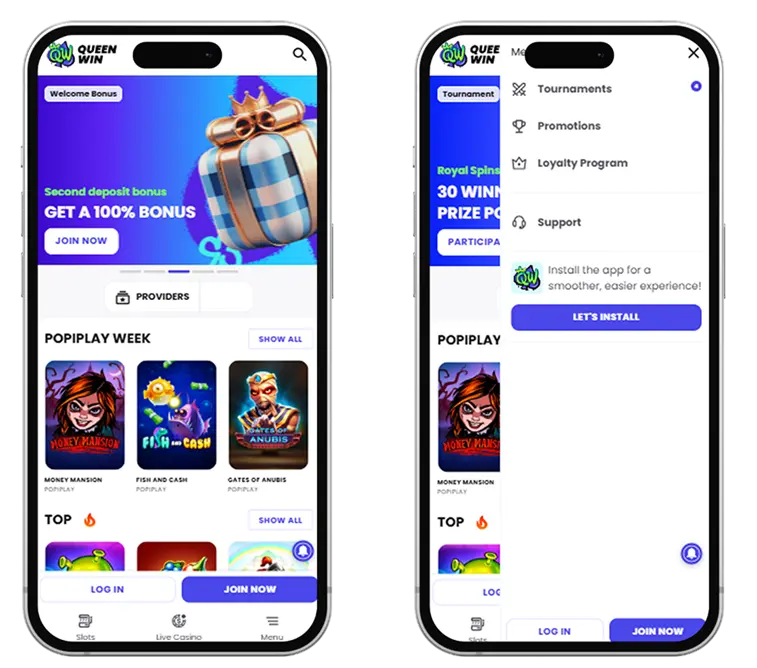
Experience the Ultimate Mobile Casino
Our QueenWin mobile version uses HTML5, which is tech-speak for “works in any modern browser.” Pull up Safari on your iPhone or Chrome on your Android, load our site, and you’re playing. Simple as that.
Here’s why this beats downloading an app:
- You’re always on the latest version.
- New slots appear the moment we add them—no “update required” message blocking you.
- Security patches apply instantly.
- Bug fixes happen in real-time.
- Traditional apps sit on your phone getting outdated until you remember to update them. Ours stays current automatically.
For Which OS QueenWin App Is Suitable?
The Queen Win app looks identical on both platforms. iOS, Android, doesn’t matter—you get the same interface designed for touchscreens. Big buttons you can actually tap without squinting. Game thumbnails sized properly for mobile screens. Menus that make sense whether you’re holding your phone vertically or sideways. Everything responds to taps, swipes, and pinches like any proper mobile site should.
Games run smoothly because HTML5 slots don’t need conversion layers or compatibility patches. Reels spin at 60fps. Live casino streams stay clear even on 4G. Payments process just as securely as standalone apps—same encryption banks use. The only real difference? You saved 150MB of storage by not downloading anything.
Features for iOS and Android Users
Android players wanting a traditional app experience can install our QueenWin apk version. Downloads like any Android app, creates an icon on your home screen, runs independently. Functionally identical to the browser—same games, same security, same everything. Pick whichever feels more comfortable.
iOS doesn’t let us distribute apps outside the App Store, but the browser version works so well on iPhones and iPads that you probably won’t care. Add our site to your home screen through Safari (instructions below) and it launches like a native app anyway.
How to Download & Install
Takes about 30 seconds either way. Methods differ slightly between iOS and Android.
For iOS
iPhones and iPads use the browser method. Here’s the setup:
- Open Safari, go to queenwin.com
- Tap the share icon (square with an arrow pointing up)
- Scroll down, select “Add to Home Screen”
- Name it whatever you want—”QueenWin” works
- Tap “Add” in the corner
Now you’ve got an icon on your home screen launching straight into our site. Opens full-screen without browser bars, looks just like a regular app for iOS. Your login saves automatically if you enable that in settings, so accessing your account takes one tap.
Updates happen behind the scenes every time you visit. No App Store nonsense, no approval delays, no storage consumed. Works on any iPhone or iPad running iOS 11.0 or newer—that’s basically everything from iPhone 6S onwards.
For Android
Two paths here: browser (like iOS above) or our APK for a traditional app.
Browser route:
- Open Chrome or whatever browser you use
- Visit queenwin.com
- Tap the menu (three dots, usually top-right)
- Choose “Add to Home screen” or “Install app”
- Confirm and name it
APK route:
- Visit queenwin.com on your Android device
- Find the “Download” section in the menu
- Tap “Download APK for Android”
- Your phone might warn about unknown sources—go to Settings > Security, enable “Unknown sources” temporarily
- Once downloaded, tap the file to install
- Follow prompts to install the Queen Win apk
- Go back to Security settings, disable “Unknown sources” again
The APK gives you a proper Android app with its own icon, push notifications, standalone operation. Updates come from our site instead of Google Play—we’ll tell you when new versions drop, then you download and install same as before.
Both work on Android 7.0 or later. That covers most phones from the last six years. Older devices might run slower on heavy graphics or live streams.
App Features Overview
Browser or APK, you get everything:
- Full game library: All 4,000+ slots, table games, live casino, fishing games from desktop work on mobile. Providers built their games for touchscreens, so spinning, betting, and bonus rounds feel natural.
- Live casino in HD: Streams from our 50+ dealer tables adjust to your connection. On WiFi or 5G, you get crystal-clear video. Weaker signal? Quality drops automatically to prevent buffering but keeps the game playable.
- Complete sportsbook: Our entire sports betting setup loads on mobile—485+ football events, 72 tennis matches, cricket, basketball, 40+ other sports. Bet before matches or during live play, all from your phone.
- Mobile payments: Deposit with Apple Pay (iOS), Google Pay (Android), cards, bank transfers, or any of our 13 cryptocurrencies. Withdrawals work same as desktop—request through your account, upload verification docs if needed via phone camera, get paid within standard timeframes.
- Battery-friendly: We optimised things so slots don’t kill your battery. Simple games (classic slots, basic tables) barely touch battery life. Fancy video slots use more power but stay reasonable—expect 2-3 hours continuous play on most phones before charging.
System Requirements
Works on most devices made in the last few years:
| Operating System | Minimum Version | Storage Needed | Browser |
| iOS | 11.0 or later | None (runs in browser) | Safari 11+, Chrome 70+, Firefox 60+ |
| Android (Browser) | 7.0 or later | None (runs in browser) | Chrome 70+, Firefox 60+, Samsung Internet 9+ |
| Android (APK) | 7.0 or later | 120 MB | N/A (standalone) |
Older devices meeting minimums will work but might load slower on graphics-heavy games or lag during busy periods. Live casino adjusts stream quality based on your device and connection automatically.
The QueenWin mobile version doesn’t store game files locally, so storage isn’t an issue unless you install our Android APK. Even then, 120 MB beats most casino apps needing 200-400 MB.